
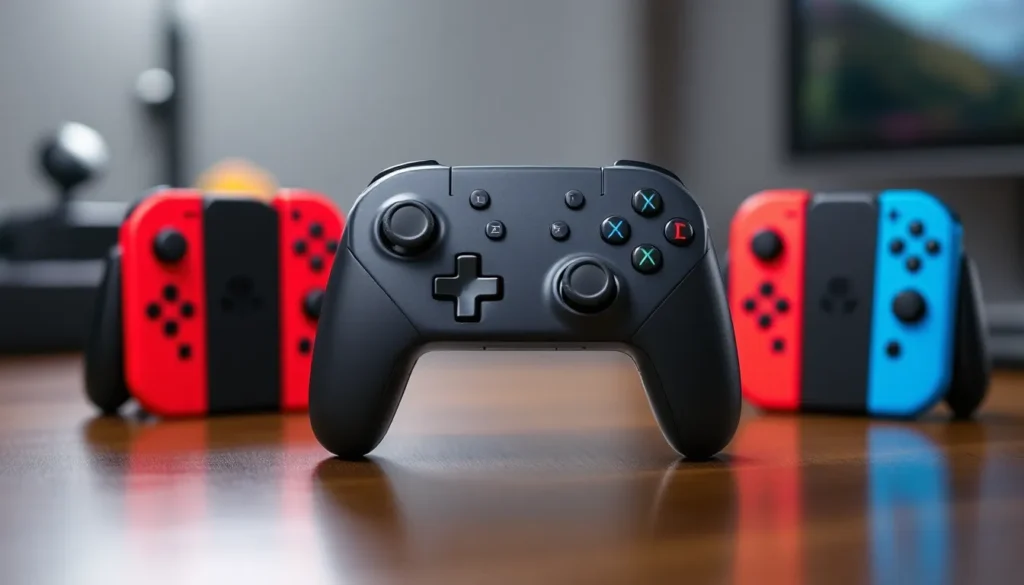
Picking the right controller can make or break your Nintendo Switch experience. Whether you’re grinding through competitive Smash Bros tournaments, exploring the Mushroom Kingdom solo, or hosting a party game marathon with friends, your input device matters, a lot. From the Joy-Cons that came in the box to specialized arcade sticks for fighting games, the Switch ecosystem offers surprising depth when it comes to controllers. This guide breaks down everything you need to know: the strengths and weaknesses of each option, what specs actually matter, how to troubleshoot common issues, and which setup fits your playstyle. We’ll skip the fluff and focus on what gamers actually care about: performance, comfort, and value.
Key Takeaways
- Joy-Cons offer versatility for party games and handheld play, but the Pro Controller for Nintendo Switch delivers superior ergonomics and precision control for extended gaming sessions.
- Stick drift, a notorious issue where analog sticks register movement without input, can often be resolved through recalibration and cleaning, with Nintendo offering free repairs if the problem persists.
- A controller for Nintendo Switch should be chosen based on your play patterns: Joy-Cons for casual and portable gaming, Pro Controller for competitive and long sessions, and specialized controllers like arcade sticks only if you’re committed to specific genres.
- Third-party controller quality varies dramatically, so prioritize models with certified Nintendo Switch compatibility, Hall effect sensors for durability, and verified user reviews before purchasing.
- Regular maintenance—including gentle cleaning with isopropyl alcohol, proper storage at moderate temperatures, and firmware updates—prevents common controller issues and extends lifespan significantly.
Understanding Nintendo Switch Controller Types
Joy-Con Controllers: The Standard Solution
Every Switch owner gets a pair of Joy-Cons in the box, and for good reason, they’re versatile and handle most games competently. These detachable wireless controllers can be used individually (one per hand) or combined into a grip for a traditional controller layout. Each Joy-Con measures about 4.2 inches and weighs roughly 1.1 ounces, making them incredibly portable.
Joy-Cons feature 10 buttons, motion controls, rumble feedback, and an IR camera (in the right Joy-Con). Battery life sits around 20 hours on a single charge. They sync wirelessly to the console and connect via Bluetooth when detached. For casual gaming and party titles, they’re perfectly adequate. But, they weren’t designed with ergonomics as a priority, extended play sessions can cause hand fatigue for some players.
Pro Controller: Premium Performance
The Nintendo Switch Pro Controller is the premium option, priced at $69.99 USD. It’s a full-sized controller with a traditional layout: symmetrical analog sticks (unlike Joy-Cons), a D-pad, four face buttons, four shoulder buttons, and dedicated menu controls. The grip is noticeably more comfortable during long sessions, and the overall build feels premium compared to Joy-Cons.
The Pro Controller offers 40 hours of battery life, uses USB-C charging, and features advanced rumble (HD Rumble). It connects wirelessly to the Switch and includes all the same motion and IR sensor capabilities as Joy-Cons. For players who spend hours on action games, RPGs, or competitive titles, the Pro Controller is the go-to choice. The larger size and weight distribution reduce hand strain significantly.
Third-Party Alternatives and Budget Options
Beyond Nintendo’s official offerings, third-party manufacturers have flooded the market. Brands like 8BitDo, PowerA, and HyperX produce controllers ranging from $20 to $80. Some are licensed by Nintendo: others operate in a gray area.
Budget options from PowerA ($30–$50) offer decent ergonomics and durability, though battery life is often shorter and the build quality doesn’t match Nintendo’s standards. 8BitDo controllers ($50–$70) are beloved by retro gaming fans and offer customization through their app.
When choosing third-party controllers, check for Nintendo Switch Compatibility certification. Not all third-party controllers work with all games, some fighting game titles, for instance, require specific licensed controllers. Read recent user reviews on Amazon or Reddit’s r/NintendoSwitch before committing: quality varies wildly even within the same brand.
Key Features to Consider When Choosing a Controller
Ergonomics and Comfort for Extended Gaming
This is where most players make their first mistake. Joy-Cons look cute, but their compact size means your fingers curl unnaturally during extended play. The Pro Controller fixes this with a larger grip and better weight distribution, resulting in less hand fatigue after 3+ hour sessions.
If you’re buying a third-party option, prioritize controllers with contoured grips, padded handles, or ergonomic shaping. Some players with smaller hands actually prefer Joy-Cons: some with larger hands find even the Pro Controller slightly cramped. Visit a store if possible to hold the controller before buying, or check detailed reviews on digital gaming hardware sites that test comfort across different hand sizes.
Button Responsiveness and Durability
Joy-Con stick drift has been a notorious issue since launch. The analog stick mechanisms wear out over time, causing the controller to register movement even when you’re not touching the stick. Nintendo has issued recalls and offered repairs, but the problem persists in later batches. Drifting is less common on Pro Controllers, though it can still happen.
Third-party controllers vary. Some use higher-quality analog sticks rated for millions of inputs: others fail within months. Button responsiveness matters too, mushy buttons or delayed input cost you matches in competitive games. Check reviews specifically mentioning “stick durability” and “input lag” before purchasing.
For fighting game enthusiasts considering third-party controllers, research the specific stick mechanism (Hall effect sensors are more durable than traditional potentiometers).
Wireless Connectivity and Battery Life
All modern Switch controllers use 2.4 GHz wireless or Bluetooth 5.0. Range is typically 20–30 feet in open space. Connectivity is stable for most setups, though interference from other wireless devices (microwave, Wi-Fi router) can cause occasional lag.
Battery life is a practical concern. Joy-Cons last around 20 hours: the Pro Controller stretches to 40 hours. Third-party controllers vary dramatically, some manage 15 hours, others barely hit 8 hours. If you game heavily, you’ll want a controller that charges quickly or lasts multiple days. USB-C charging is standard now, making it easier to find compatible cables.
Joy-Con Controllers: Depth and Versatility
Single Joy-Con Gameplay and Motion Controls
Joy-Cons shine when used individually. Games like Ring Fit Adventure, 1-2-Switch, and Wii Sports-style titles rely heavily on single Joy-Con motion controls. Held vertically or horizontally, a single Joy-Con can recognize gestures, swings, and rotations through its built-in gyroscope and accelerometer.
The IR camera in the right Joy-Con adds another layer, it can track objects or hands in front of the console, enabling motion-controlled experiences that’d be impossible with a traditional controller. This is why certain games (like some Nintendo Switch Sports titles) specifically require Joy-Cons rather than the Pro Controller.
For single Joy-Con gaming, comfort is secondary to fun factor. The small size is actually an advantage, kids and players with smaller hands often prefer it. The rumble feedback is strong, making actions feel tactile even when holding a compact controller.
Dual Joy-Con Setup and Multiplayer Gaming
When both Joy-Cons are attached to the included grip or held separately, they form a complete controller layout suitable for almost any game. The separated Joy-Cons can be used for local multiplayer, hand one to a friend and you’re ready to play Mario Kart, Smash Bros, or any couch co-op title.
This versatility is huge. You don’t need extra controllers to host a four-player game if you’ve got two pairs of Joy-Cons. The symmetrical stick layout (both Joy-Cons have sticks on the left side when separated) takes getting used to, but it’s intentional design for balanced multiplayer.
The included grip makes the Joy-Cons more comfortable during longer single-player sessions by holding them in a traditional controller posture. Some aftermarket grips add padding or ergonomic curves for better comfort.
Common Joy-Con Issues and Solutions
Stick drift is the elephant in the room. If your Joy-Con’s analog stick is registering movement without input, try these steps before escalating to repairs:
- Recalibrate the stick via System Settings > Controllers and Sensors > Calibrate Control Sticks.
- Clean around the stick base with a cotton swab and isopropyl alcohol (the solvents can dissolve dried debris).
- Use the Joy-Con in a different orientation if drift persists, sometimes the angle matters.
If drift returns immediately, the potentiometer is likely worn. Nintendo offers free repairs for Joy-Cons with drift (sometimes even out of warranty). Mail-in repair typically takes 1–2 weeks. For competitive players who can’t wait, buying a replacement Joy-Con pair ($70–$80) is the practical solution.
Other issues include connection drops (resync the controller via System Settings), button unresponsiveness (same cleaning technique), and battery not holding charge (first try a full drain and recharge: if it persists, the battery likely failed).
Pro Controller: Advanced Features for Competitive Play
Superior Ergonomics and Precision Control
The Pro Controller was designed for serious gaming. The grip is substantially larger than Joy-Cons, approximately 5.5 inches wide and weighing 0.88 ounces. The buttons sit in familiar positions (mirroring Xbox and PlayStation layouts), so players switching from other consoles feel instantly at home.
The analog sticks are symmetrical and positioned lower on the controller face, reducing finger strain during extended play. Shoulder buttons are easily accessible without reaching. The D-pad, rarely a priority on Joy-Cons, is now a proper cross-shaped button, essential for 2D platformers and fighting games.
Precision matters in competitive gaming. The Pro Controller’s larger sticks offer more granular control over movement, especially in games like Splatoon 3 or competitive shooters. The responsiveness is noticeably sharper than Joy-Cons, and stick drift issues are far less common (though still possible). For experiencing intense action on the Switch, the Pro Controller is the recommended setup.
Advanced Customization Options
The Pro Controller supports button remapping through most games’ settings menus, and some titles offer controller-specific configurations. Nintendo’s own games rarely require this, but third-party developers sometimes include advanced options.
Beyond in-game remapping, third-party software (like some 8BitDo tools) allows deeper customization on aftermarket Pro Controller alternatives. You can adjust stick sensitivity, button repeat rates, and even create profiles for specific games.
The Pro Controller integrates with the Switch’s motion controls the same way Joy-Cons do, but the larger form factor makes motion gaming less intuitive. It’s not a weakness, most players prefer the Pro Controller for non-motion games anyway.
Specialized Controllers for Different Gaming Genres
Fighting Game Controllers and Arcade Sticks
Fighting game communities have different input standards. Some players prefer traditional controllers: others swear by arcade sticks. The Switch supports specialized fight sticks from manufacturers like Hori, Mad Catz, and Victrix.
Fight sticks use a joystick (similar to arcade cabinets) and separate buttons arranged in a grid. Popular configurations include:
- Hitbox-style: Directional buttons instead of a joystick (preferred by many pro players)
- Traditional arcade stick: Joystick plus six buttons in two rows
Price ranges from $150 to $400+. Hori’s Fighting Stick Mini ($150) is a popular entry point: the Victrix arcade stick sits at $200–$350. These controllers are licensed by Nintendo and work seamlessly with games like Super Smash Bros Ultimate, Street Fighter, and Tekken.
The learning curve for arcade sticks is steep if you’re coming from a pad, but the muscle memory transfers well to arcade cabinets if you ever play competitively offline. Casual players should stick with the Pro Controller, the arcade stick is specialized equipment with a niche audience.
Racing Wheels for Driving Simulation
Mario Kart 8 Deluxe is playable with any controller, but dedicated racing wheels elevate the experience. HORI’s Mario Kart Racing Wheel Pro Deluxe ($90) is the official Nintendo option, a wheel with pedals and force feedback that mounts to a table.
Third-party racing wheels from manufacturers like Thrustmaster offer more features (variable force feedback, customizable buttons) but cost $150–$300. They’re overkill for casual Mario Kart but essential for serious racing sim fans.
Racing wheels connect wirelessly and require a stable mounting surface. They’re not portable, don’t expect to take them on a trip. For handheld play or on-the-go gaming, a standard controller is your only realistic option.
Portable and Compact Options for Handheld Play
The Switch’s portability is its core strength, but holding the console directly can be uncomfortable. Portable controllers solve this by providing external input while keeping the console in a stand or lap.
Clip-on controllers like PowerA’s Nano Wireless Controller ($35) are lightweight and designed specifically for handheld play. They’re smaller than Joy-Cons and less ergonomic for long sessions, but they’re cheap and functional for casual gaming.
Another approach: use Joy-Cons with a portable grip case. Brands like Satisfye and Skull & Co sell ergonomic grips ($20–$40) that transform Joy-Con usability during handheld mode. These grips add bulk, but the comfort improvement is worthwhile if you regularly play in handheld mode for hours.
For competitive handheld gaming (like during travel), the Pro Controller isn’t an option, you need the console in front of you, and a portable grip with standard Joy-Cons is the practical choice.
Maintenance, Troubleshooting, and Care Tips
Cleaning and Proper Storage
Controllers accumulate dust, skin oils, and debris over time. Regular cleaning extends their lifespan and prevents button sticking or stick drift acceleration.
Cleaning routine:
- Unplug or disconnect the controller.
- Use a soft, slightly damp microfiber cloth to wipe the surface.
- For hard-to-reach areas around buttons or sticks, use a cotton swab with isopropyl alcohol (70% concentration). The alcohol evaporates quickly and won’t damage electronics.
- Avoid excessive moisture, never submerge a controller or spray liquid directly onto it.
- Let the controller air dry for 5 minutes before reconnecting.
For stubborn grime (like dried food residue from snacking during gaming), patience is key. A gentle cotton swab and multiple light passes will eventually clear debris without scratching the plastic.
Storage tips:
Store controllers in a cool, dry place. Extreme heat (above 95°F) can degrade battery performance: excessive cold (below 32°F) slows charging. Avoid storing controllers with the battery fully drained for extended periods, this can damage the battery chemistry. Charge to around 50% if storing for weeks.
Keep controllers away from direct sunlight and humidity. If you’re storing a Switch for months, remove the Joy-Cons and keep them separate to prevent battery drain.
Firmware Updates and Connectivity Issues
Nintendo periodically releases firmware updates for controllers, usually bundled with system updates. These updates can improve connectivity, fix button mapping issues, or add new features.
To update controller firmware: Connect the controller, launch System Settings > System > System Update. The system will prompt you if updates are available.
Connectivity troubleshooting:
If a controller drops connection mid-game:
- Re-sync it via System Settings > Controllers and Sensors > Change Grip/Order, then press the sync button on the controller.
- Move closer to the console (wireless interference from obstacles or other devices can cause drops).
- Restart the console. Power off, wait 10 seconds, then restart.
- For persistent issues, try “Forget” the controller in Bluetooth settings and re-pair it from scratch.
If the controller won’t connect at all, check the battery level. Some controllers shut off wireless after reaching critical battery, requiring a charge before they’ll sync.
Dead zones can develop over time, causing unexpected drift or unresponsive input. You can recalibrate the sticks via System Settings > Controllers and Sensors > Calibrate Control Sticks. This resets the mapping of stick positions, often fixing minor issues.
If protecting your Switch with proper accessories is a priority, the same care philosophy applies to controllers, prevention is easier than repair. Clean regularly, charge properly, and store thoughtfully, and your controller will outlast most of your games.
Conclusion
Choosing the right Nintendo Switch controller comes down to matching your gaming habits to the tool. Joy-Cons are versatile and portable, perfect for party games and handheld play. The Pro Controller is the comfort and precision choice for serious single-player and competitive gaming. Specialized controllers (arcade sticks, racing wheels) cater to specific genres and are worth the investment only if you’re genuinely interested in those playstyles.
Start by honestly assessing your play patterns. Do you play mostly docked or handheld? Are you casual or competitive? Do you value portability or comfort? Your answer determines whether Joy-Cons, a Pro Controller, or both makes sense for your setup.
Maintenance matters too. Regular cleaning and careful storage prevent the common issues that plague controllers over time. Stick drift and button failure aren’t inevitable, they’re accelerated by neglect. Treat your controller like the precision input device it is, and it’ll reward you with years of reliable gaming.
In 2026, the Switch’s controller ecosystem is mature and stable. The options available cover nearly every gaming scenario imaginable. Whatever you choose, focus on what feels right in your hands and supports the games you actually play. That’s the only metric that truly matters.